Material 3 Expressive Introduces Scrolling Time Picker and Google AI Studio Upgrades Android App Building
· GlobeWire Daily Editorial Desk · Source: 9to5google.com
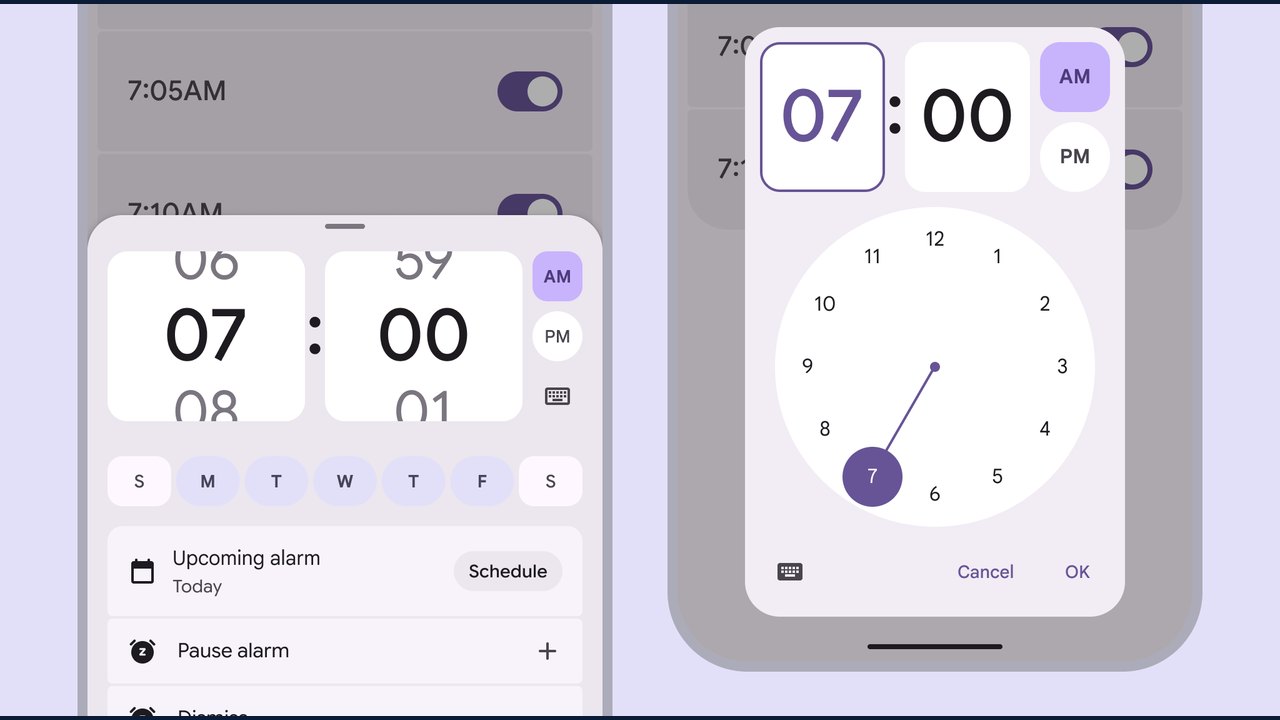
Image: Abner Li · Photo source · Resized and letterboxed to 16:9; no AI generation
Google has announced updates to its design components and developer tools, introducing a new Material 3 Expressive time picker alongside several enhancements for Android app creation in Google AI Studio.
Material 3 Expressive Updates
The updated Material 3 Expressive time pickers feature several design changes compared to standard Material 3 components:
- Removal of the "Select time" hint from the top-right corner.
- Redesigned AM and PM buttons with expressive shapes, colors, and behaviors.
- Higher contrast for hour, minute, and dial selector fields.
The New Scroll Time Picker and Fields
Google has added a vertical scroll variant for picking times, intended for setting alarms or scheduling events without using a keyboard or analog clock. The Material Design team describes this as a compact option suited for inline placement with other content. Users can switch back to the input picker via a keyboard icon.
Additionally, Google introduced scroll fields for selecting measurement units such as distance, weight, temperature, water, and calories.
Google AI Studio Android App Enhancements
Google AI Studio has rolled out updates aimed at improving the Android app development workflow:
- Full-stack persistence: Automatic provisioning of Cloud Firestore databases with Security Rules and Google Sign-In.
- Secure Gemini API calls: Calling Gemini models from Android apps using Firebase AI Logic and Firebase App Check without exposing API keys in APKs.
- Personal Google Play publishing: Direct deployment to a personal Google Play library using a standard Google account.
- Faster emulator: Browser-based Android emulators with lower latency, HD video streaming toggles, and real-time audio.
- Visual UI editing: One-click screen capture from running emulators to attach to prompts for UI guidance.
- Custom typography: Support for custom fonts in Jetpack Compose UIs backed by the Android CLI.
Practical Implications and Verification
Developers and designers can review the official Material Design documentation and Google AI Studio release notes to verify these component changes and platform updates. Testing new features in a controlled environment is recommended before production deployment.
AI-assisted reporting; source claims are attributed and have not been independently verified.
More to read
 Google Introduces Direct File Generation and Editing Capabilities in the Gemini App
 Google Gemini Introduces In-App File Editing for Docs and Other Formats
 Google Introduces Immersive Explorations Feature in the Gemini App
 Google Voice App Receives Android Redesign Amid Anticipated RCS Integration