omux: A Native macOS Terminal Manager for Running Multiple Coding Agents
· GlobeWire Daily Editorial Desk · Source: github.com
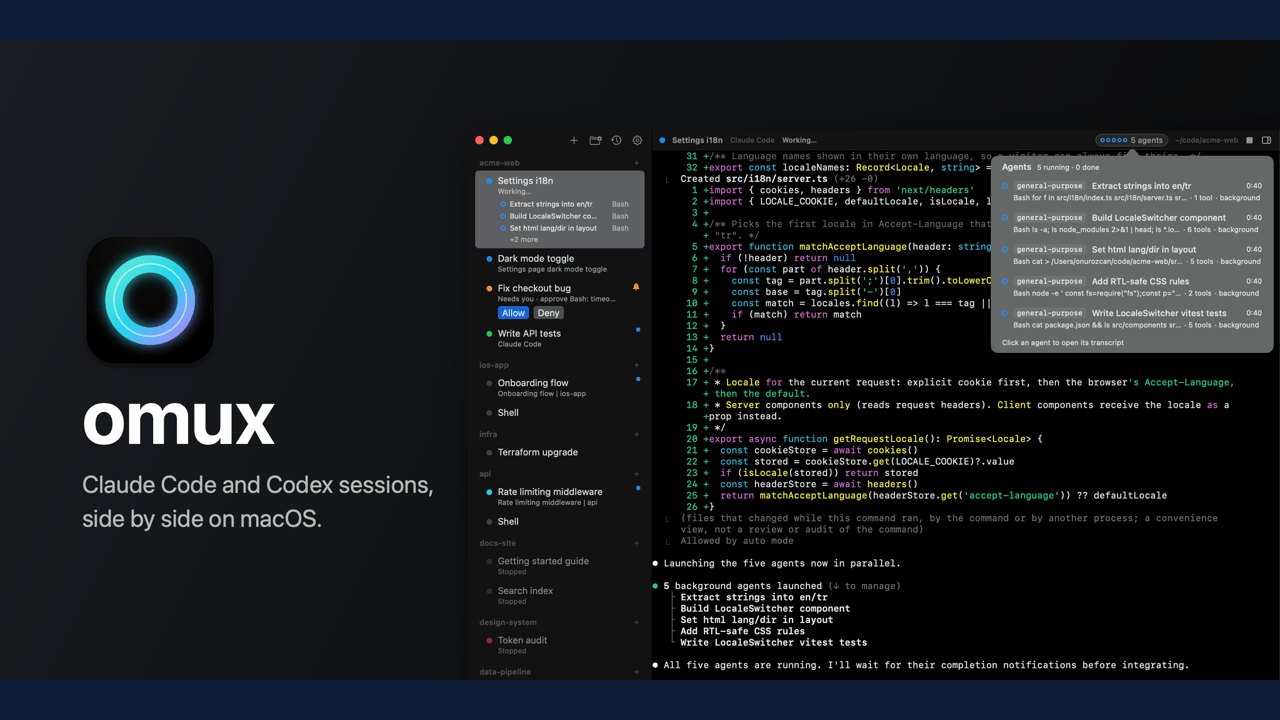
Image: GitHub · Photo source · Resized and letterboxed to 16:9; no AI generation
Managing multiple AI coding assistants simultaneously often involves constant tab switching and window juggling. A new open-source project called omux, developed by Onur Özcan, aims to address this workflow challenge by providing a native macOS terminal specifically designed to run and monitor multiple Claude Code and Codex sessions side by side.
Core Architecture and Design
Built entirely using Swift, SwiftUI, and SwiftTerm, omux avoids Electron and web-view frameworks. The application has a lightweight footprint of approximately 5 MB and launches instantly. Because it is written natively for macOS, it operates without telemetry and is designed to run on Apple Silicon hardware running macOS 14 or later.
Key Features and Workflow Integration
According to the project documentation, omux includes several specialized capabilities for managing multiple AI agents:
- Centralized Sidebar: All active agent sessions are listed in a single sidebar organized by projects.
- Status Tracking: The interface displays whether an agent is actively working, requires user input, or has completed its task, with pending actions also indicated via a macOS Dock badge.
- Inline Approvals: Users can respond to Claude Code permission prompts and Codex approvals directly from the sidebar using dedicated Allow and Deny buttons without switching windows.
- Resumable Conversations: Sessions maintain their exact conversation state across application restarts and relaunches.
- Git Worktree Integration: Worktree sessions can be assigned separate branches and folders. Pull request checks and reviews appear directly alongside the session, allowing users to send failing check details back to the agent with a single click.
- Code Review Tools: Users can read diffs, leave line notes, and bundle them into a single message for the agent.
Network Usage and Privacy
The documentation states that omux communicates with the network for a limited set of functions: checking usage limits using Claude Code's login credentials stored in the Keychain, and retrieving pull request status via the GitHub CLI (`gh`). The project documentation emphasizes that no personal or machine data is transmitted elsewhere.
Requirements and Installation
To run pre-built releases, users need a Mac with Apple Silicon running macOS 14 or later. Depending on the desired functionality, Claude Code or Codex CLI must be installed independently. Building from source requires Swift 6.2 or later.
Users can verify the project details, building instructions, and privacy specifications directly via the official GitHub repository (`onurozcan/omux`). It should be noted that omux is an independent project and is not affiliated with or endorsed by Anthropic or OpenAI.
AI-assisted reporting; source claims are attributed and have not been independently verified.
More to read
 nodeterm Introduces Spatial Terminal Manager for AI Coding Agents Across Desktop, Browser, and Mobile
 Universal Modder Open-Source Project Brings AI Coding Agents to PC Game Modding
 Juggler Visual Workbench Connects AI Coding Agents Locally and Remotely
 Open-Source Tool Hypit Enables Coding Agents to Generate and Clone Videos
Trending on GlobeWire Daily
Selected from recent coverage and related topics; not live search rankings.