GitHub Announces General Availability of Security Advisory Permissions for Custom Repository Roles
· GlobeWire Daily Editorial Desk · Source: github.blog
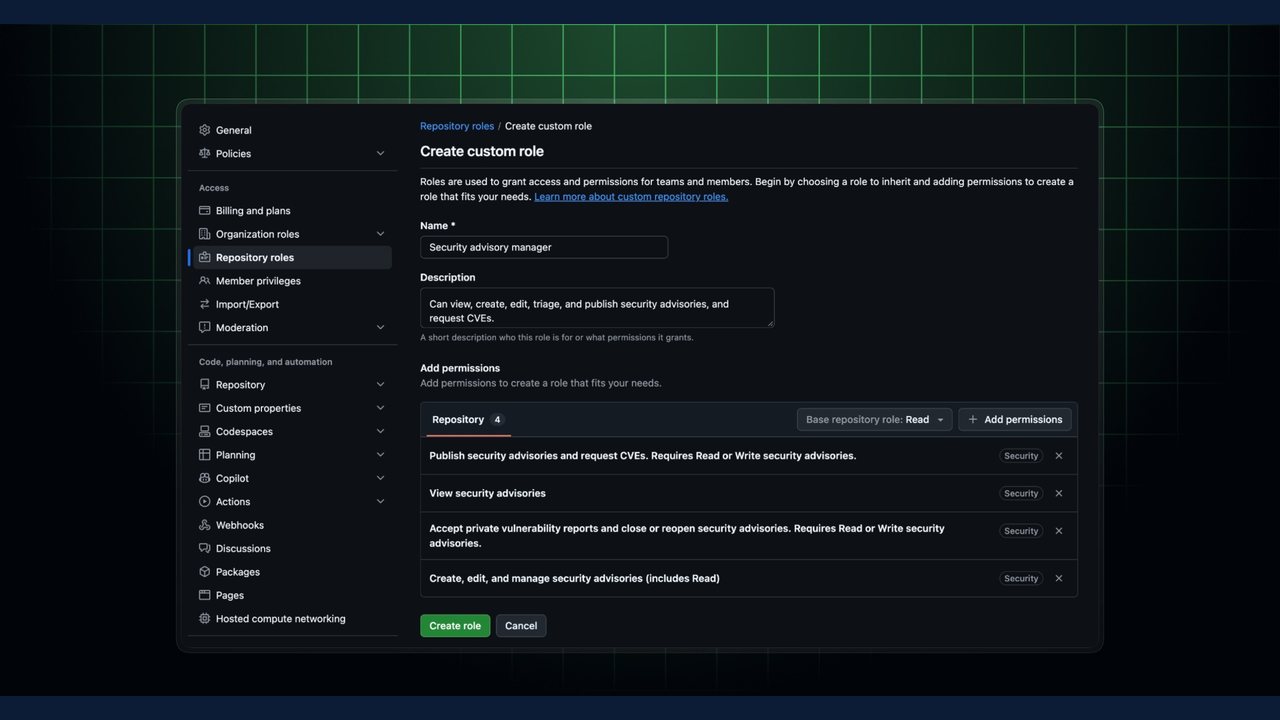
GitHub has announced that new security advisory permissions are now generally available, allowing organization owners to grant repository security advisory access through custom repository roles without granting full repository administrator or organization-wide security manager privileges.
According to the official announcement published on November 20, 2026, four new permissions are now available under the Security section when creating or editing a custom repository role:
- View security advisories: Allows viewing draft security advisories, their status, and comments.
- Create, Edit, and Manage security advisories: Includes viewing capabilities alongside creating and editing advisories, commenting, managing collaborators, and creating a temporary private fork.
- Accept private vulnerability reports and close or reopen security advisories: Requires either the View or the Create, Edit, and Manage permission.
- Publish security advisories and request CVEs: Requires either the View or the Create, Edit, and Manage permission.
Practical Implications and Access Control
Organization owners can assign these roles to specific users and teams on only the repositories where access is needed. The permissions apply to both repository security advisories and private vulnerability reports, limiting exposure compared to organization-wide assignments.
However, certain restrictions remain in place:
- Merging changes from a temporary private fork still requires a repository administrator or security manager.
- Individuals with any of the new permissions cannot delete a temporary private fork.
- Confidential comments are restricted to individuals with Create, Edit, and Manage permissions who also hold write access to the repository.
Availability and Verification
This feature is available to organizations on plans that support custom repository roles, including GitHub Enterprise Cloud. Organizations interested in implementing these settings can review the official documentation under "Repository security advisories" in the GitHub Docs to verify setup instructions and plan requirements.