Apps & Software
God's Eye View: Real‑time 3D Global Simulator Brings Public Data to Your Browser
· GlobeWire Daily Editorial Desk · Source: github.com
Key takeaways
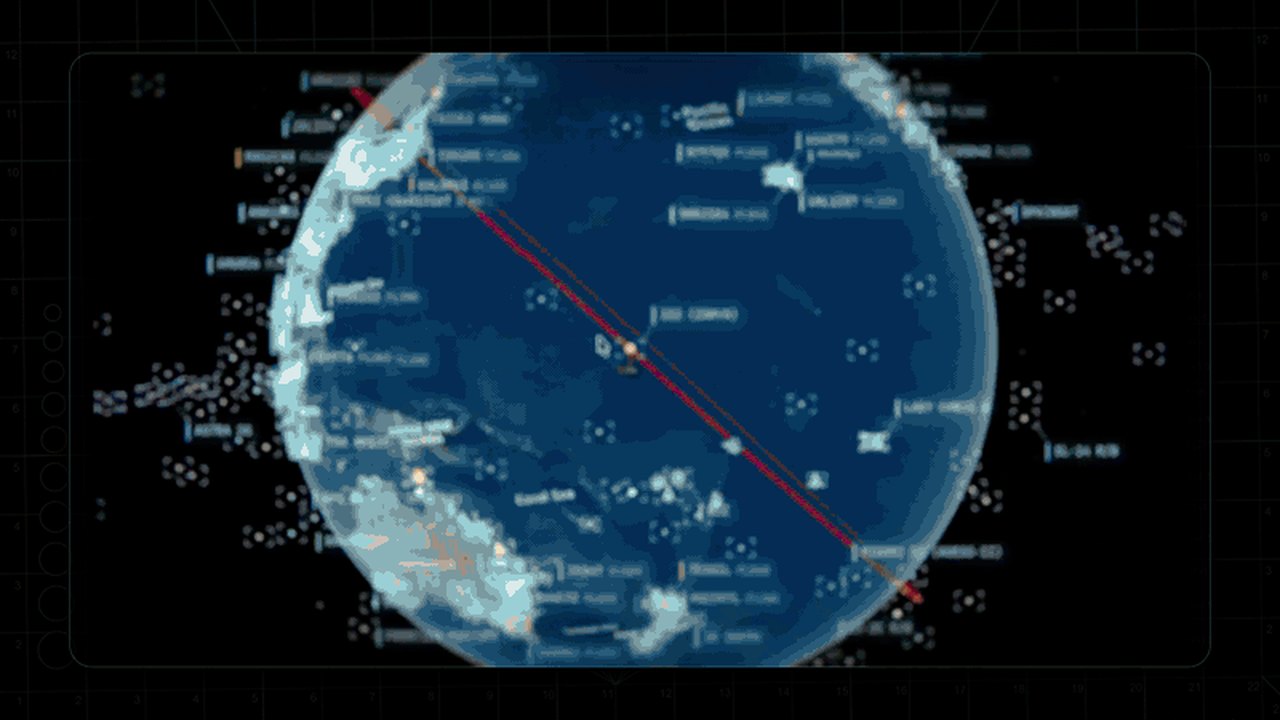
Image: GitHub · Photo source · Resized and letterboxed to 16:9; no AI generation
Overview
- What it is: An open‑source web app that renders a photorealistic 3D globe and overlays live information from aircraft, ships, satellites, earthquakes, traffic and public cameras.
- Confirmed: The project is hosted on GitHub under the repository bilawalsidhu/gods-eye-view.
- Reported: It is described as a “spy‑satellite simulator” that uses publicly available feeds.
- Unknown: The exact number of data sources and their update frequency are not disclosed.
Key Features
- Live Layers: Real‑time aircraft tracking, vessel monitoring, orbital data, seismic activity and camera feeds.
- Hands‑free Interaction: Voice‑controlled AI agent that can answer location queries and provide context.
- Sensor Styles: Multiple visual modes (CRT, NVG, FLIR/thermal, Noir) that change how the globe appears.
- 3D Models: Detailed aircraft models for major types and dynamic swapping as you approach.
- Shareable Views: URLs that preserve camera angle, style, active layers and tracked targets.
- Reset Globe: One‑click return to a full Earth view.
Technical Details
- Platform: Runs locally in a browser; no account or API keys required for basic layers.
- Setup: Can be installed via Pinokio or run from the terminal; optional keys unlock photorealistic rendering and additional services.
- Data Sources: Uses aggregated public data; traffic simulation is based on location aggregates, while camera and launch data are coarse estimates.
- Performance: Benchmarked at ~1.86 seconds cold start on a typical machine; performance varies with hardware and network.
Practical Implications
- Accessibility: Anyone with a modern browser can explore global activity without specialized hardware.
- Transparency: All code is inspectable, allowing users to verify how data is collected and displayed.
- Potential Uses: Educational demonstrations, situational awareness, and informal monitoring of public signals.
- Limitations: Some feeds are approximations; precise real‑world accuracy depends on the underlying public data quality.
How to Verify the Original Announcement
- Visit the GitHub repository to examine the source code and documentation.
- Check the project’s release notes or changelog for updates on data feeds and new features.
- Test the live demo in a browser to confirm that the described layers appear as advertised.
- Review community discussions or issue trackers for known bugs and data gaps.
Conclusion
God's Eye View offers a unique window into publicly available global activity by combining a realistic 3D globe with a variety of live data layers. Its open‑source nature and low barrier to entry make it a valuable tool for anyone interested in spatial intelligence, while users should be aware of the inherent approximations in the underlying feeds.
Share this article
Read the original source: bilawalsidhu/gods-eye-view: A spy satellite simulator in your browser, except the data is real. Live open source spatial intelligence on a photorealistic 3D globe. - GitHub
AI-assisted reporting; source claims are attributed and have not been independently verified.
More to read
 OpenJarvis Brings Fully Local‑First Personal AI to Your Device
 Zelda: Ocarina of Time Remake Brings Fresh Perspectives to Hyrule
 Reported: Bill Maher Challenges Kid Rock’s Remarks on 9/11 Hijackers During 'Real Time' Panel
 Global Backlash Grows Against Rapid Expansion of AI Data Centres
Trending on GlobeWire Daily
Selected from recent coverage and related topics; not live search rankings.
 Harley-Davidson Pan America: Specifications & buying guide
 Ducati Mach 1: Specifications & buying guide
 Zeekr 001: Specifications, variants & buying guide
 Wuling Zhengtu: Specifications, variants & buying guide
 Samsung Galaxy Note 3: Specifications & buying guide
 Huawei Ascend P6: Specifications & buying guide