Google Brings 'Computer Use' Automation Feature to Gemini Mac App
· GlobeWire Daily Editorial Desk · Source: www.engadget.com
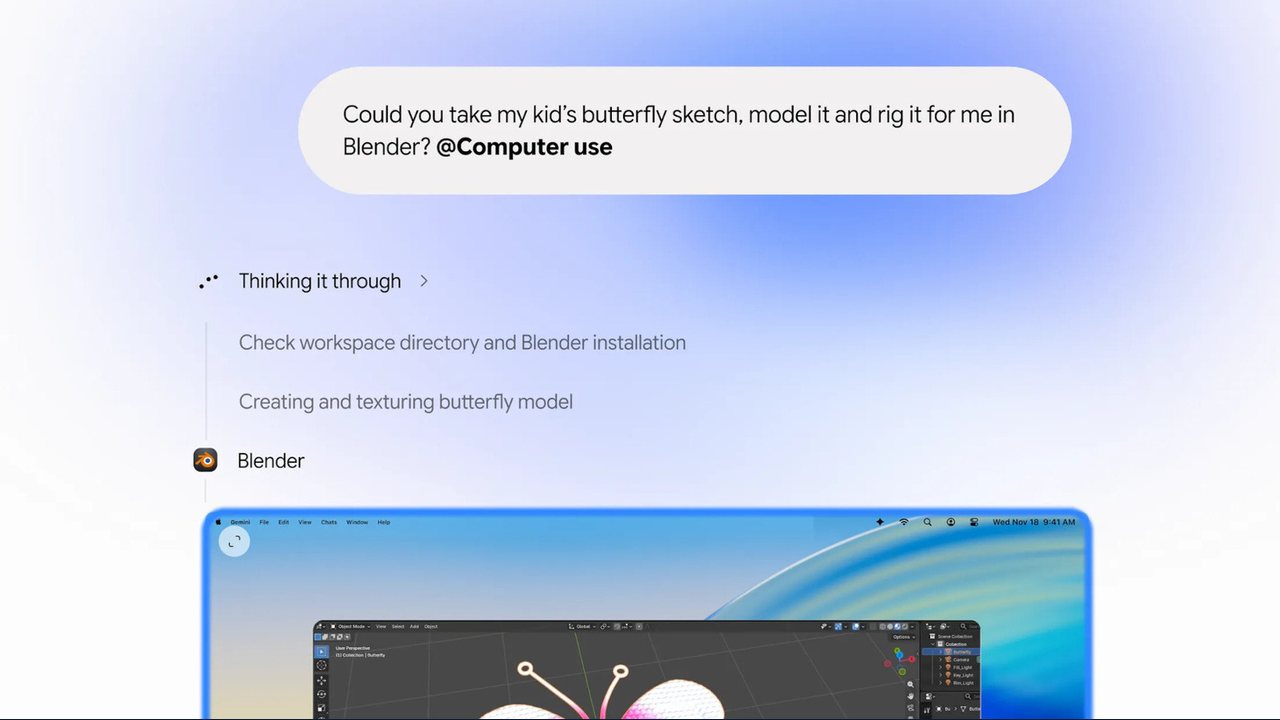
Google has updated its Gemini desktop application for macOS to include "Computer Use" capabilities, allowing the AI to autonomously handle repetitive workflows. While this functionality was previously released for PC users, the Mac update introduces screenshot-based screen reading, clicking, typing, scrolling, and cross-application navigation.
According to the announcement, users can instruct Gemini in natural language to perform multi-step tasks. The application executes these operations within a background window while displaying a live preview inside the chat interface, meaning it does not take direct control of the user's main screen cursor.
Key Capabilities and Examples
- Batch E-commerce Listings: Gemini can review local photo folders, research market pricing, log details, and stage multiple items for sale on platforms like eBay.
- Document Completion: The AI can assist in filling out local PDF files, such as shipping declaration paperwork.
- Creative Workflows: Users can employ the tool to accelerate tasks like transforming pencil sketches into 3D models.
Privacy and Operation Controls
- Access Limitations: Gemini is restricted to programs and applications that the user explicitly grants permission to access.
- User Approvals: The system requests direct user approval before executing key actions.
- Background Processing: Tasks run independently in the background, allowing uninterrupted use of the computer.
To verify the original announcement, users can consult Google's official product updates and release notes for the Gemini desktop application.
More to read
 Google Expands Gemini and Search Connected Apps with Target, Grocery Chains, and Financial Services
 Google Gemini Notebook Adds Interactive Site Builder for Research Projects
 Google Announces Plans to Retire Nest App and Speaker Assistant by 2027
 Google Health Update Brings In-Progress Workout Card to Fitbit Air and Other Devices