AirBridge Brings Custom Wrist Vibrations for Calls and Priority Apps to Fitbit Air Bands
· GlobeWire Daily Editorial Desk · Source: github.com
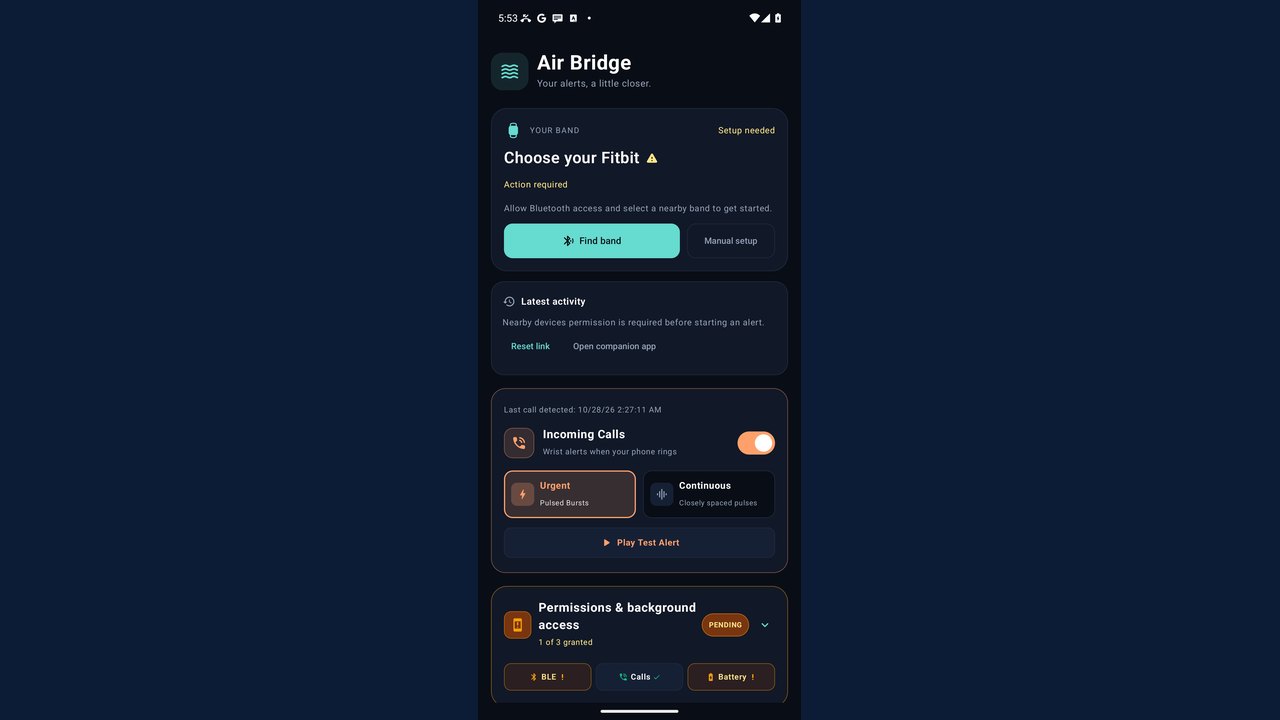
Image: GitHub · Photo source · Resized and letterboxed to 16:9; no AI generation
Overview
AirBridge is an independent Android application that lets users of the Google‑branded Fitbit Air band receive distinct vibration patterns for incoming phone calls and up to five chosen app notifications. The app works over pure Bluetooth Low Energy (BLE), processes alerts entirely on the phone, and does not rely on any cloud service.
Confirmed Features
- Call alerts – three‑pulse bursts or continuous pulses that repeat for up to 60 seconds while the phone rings.
- App alerts (Full edition) – users can select up to five installed calling or messaging apps (e.g., WhatsApp, Instagram, Telegram) and assign a unique vibration pattern to each.
- Priority‑app rules – another set of up to five notification‑based rules, each with its own pattern.
- Schedules – optional workout and sleep presets, weekday windows, and overnight periods that can silence or enable alerts.
- Bluetooth discovery – automatic detection of nearby BLE devices, classic Bluetooth devices, and paired phones. The first compatible Fitbit Air is saved as the default band.
- Connection controls – test‑vibration button, pause‑alerts during sync, and automatic reconnection attempts.
- Offline‑only operation – all vibration logic runs locally; no data is sent to a server.
Installation & Compatibility
- Supported devices – ARM64 Android phones running Android 8.0 (Oreo) or newer.
- APK types – two signed releases are offered on GitHub: Calls (phone‑call only, no notification‑listener) and Full (calls + app notifications + priority rules). Only one edition can be active for a given band.
- Permissions required – Bluetooth, phone‑state, and for the Full edition, notification‑access. The APK also declares Internet permission for its internal connection stack, though the app does not use the network for alert processing.
- Installation notes – Users may need to temporarily disable Play Protect scanning to install the APK, then re‑enable it and run a scan. Some phones block direct browser downloads; an ADB/USB method is documented in the repo.
Privacy & Security
- The app does not collect or upload call‑or‑message content, caller IDs, OTP codes, or any other personal data.
- Notification‑access is limited to reading the presence of a notification; the listener does not extract text.
- Because the app runs offline, the primary security risk is the usual Android permission model. Disabling Play Protect reduces protection and is not recommended for casual users.
Limitations & Unknowns
- Reliability of live call delivery – the repository notes that battery impact and uninterrupted Fitbit sync are still being verified.
- Compatibility with other Fitbit models – only the Fitbit Air has been tested; other bands remain unverified.
- Bluetooth handshake latency – the first connection per ringing session may experience a short delay, as the handshake is not instantaneous.
- Phone‑specific acceptance – the Calls edition removes the notification‑listener declaration that caused installation blocks on some devices, but success is not guaranteed on every phone.
How to Verify the Announcement
- Visit the official GitHub page: `https://github.com/ashu-sa/AirBridge`
- Check the Releases tab for the signed APKs and the accompanying signing guide.
- Review the `README.md` for the feature list, permission requirements, and known issues.
- After installation, enable Bluetooth and notification‑access (Full only), select your Fitbit Air, and use the Test Vibration button to confirm that patterns are distinct.
- Run a Play Protect scan post‑install to ensure the package is recognized as safe.
Practical Implications
- Hands‑free awareness – Users can differentiate a phone call from a WhatsApp message without looking at the screen, useful during workouts or meetings.
- Battery considerations – BLE communication is low‑power, but the experimental live‑call delivery may increase drain; monitor battery usage after a few days.
- No cloud dependency – Because alerts are processed locally, the app works even when the phone has no data connection, aligning with privacy‑focused users.
- Potential for broader adoption – If the developer expands testing to other Fitbit models, the approach could become a standard way to add custom haptic feedback to wearables.
--- *All statements are based on the publicly available GitHub repository and its documentation. No independent testing has been performed.*
AI-assisted reporting; source claims are attributed and have not been independently verified.
More to read
 Russian Bombing Kills 29 at Ukraine Aid Centre and Air Alert Apps Hacked
 God's Eye View: Real‑time 3D Global Simulator Brings Public Data to Your Browser
 Win11Debloat Script Offers Customization and Removal of Pre-installed Apps for Windows
 Air Marshal Ashutosh Dixit: Career, Experience, and Contributions to the Indian Air Force
Trending on GlobeWire Daily
Selected from recent coverage and related topics; not live search rankings.
 Harley-Davidson Pan America: Specifications & buying guide
 Ducati Mach 1: Specifications & buying guide
 Zeekr 001: Specifications, variants & buying guide
 Wuling Zhengtu: Specifications, variants & buying guide
 Samsung Galaxy Note 3: Specifications & buying guide
 Huawei Ascend P6: Specifications & buying guide