Instagram Details Reposting Feature Mechanics, Visibility, and Management Controls
· GlobeWire Daily Editorial Desk · Source: www.engadget.com
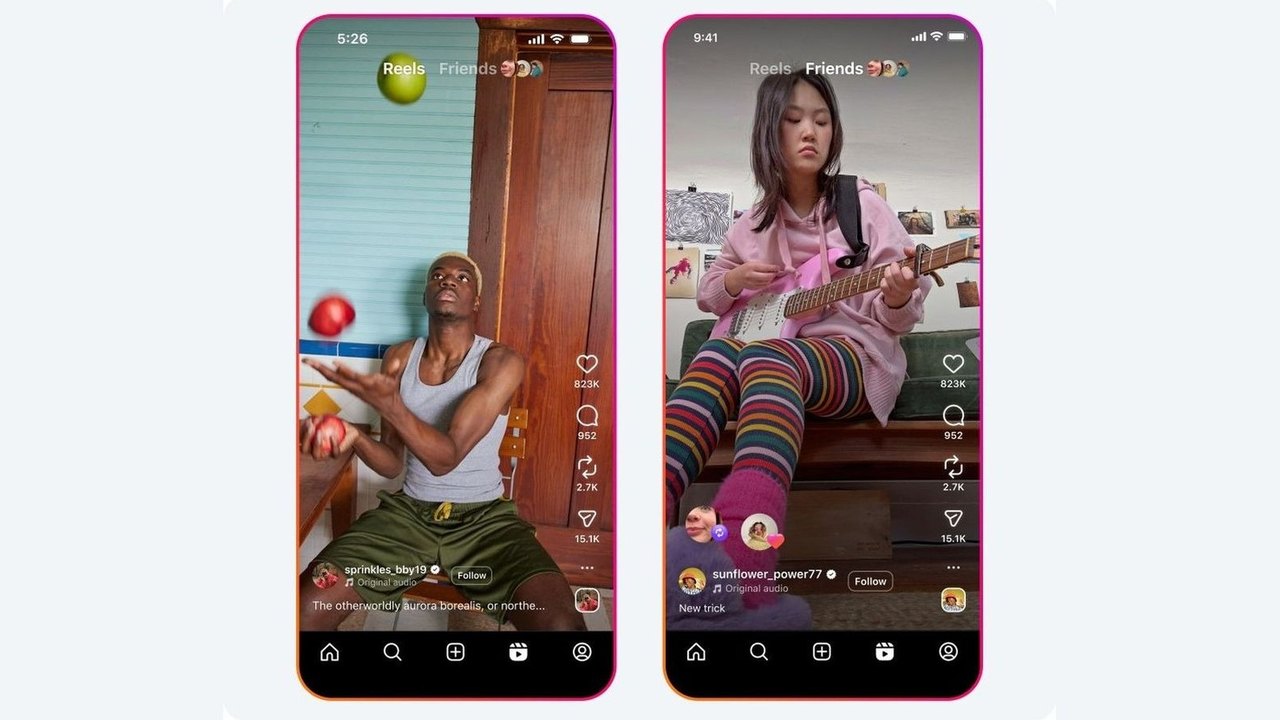
Image: Gabriela Vătu · Source image rights not independently verified · Photo source · Cropped to 16:9; original source image
Understanding Instagram's Repost Feature
Instagram has outlined the mechanics and management controls for its repost feature, which allows users to reshare public posts and reels directly to their followers. Represented by an icon of two curved arrows located beneath posts and reels, the tool aims to simplify content sharing without requiring users to manually copy material into Stories or send individual direct messages.
According to published details, the function is designed to maintain a direct attribution link to the original creator. When a user reposts content, the material appears in a dedicated tab on the user's profile and enters the feeds of their followers, as well as the Friends tab within Reels. Unlike temporary Story shares that disappear after 24 hours, reposts remain accessible on the profile indefinitely.
Platform Functionality and User Impact
For creators, the feature provides a mechanism for content to reach expanded audiences while preserving proper credit. For users, the tool offers a way to curate public content on their profiles.
- Attribution: Reposted items remain tied to the original creator rather than registering as the user's original work.
- Availability: Content can only be reposted if the original creator permits it.
- Duration: Reposts persist beyond the 24-hour window typical of ephemeral sharing methods like Stories.
Managing Repost Settings and Accidental Shares
Because the repost button is positioned near the like and comment icons, accidental selections can occur. The platform provides multiple methods to reverse or delete unwanted reposts:
- Tapping the repost button a second time on the original post.
- Long-pressing the post and selecting the deletion option.
- Accessing profile activity through `Profile > Your activity > Reposts` to bulk-select and remove items.
Users can also control whether others are permitted to reshare their own content by navigating to profile settings, selecting the menu, opening "Sharing and reuse," and toggling the preference under "Allow people to share your posts and reels."
Readers seeking to verify these instructions or review the complete feature guidelines can consult the original report on Engadget.
AI-assisted reporting; source claims are attributed and have not been independently verified.
More to read
 TikTok Expands Beyond Social Media With New Features Aiming for Super App Status
 How Disabling YouTube Music's Smart Downloads Can Fix Android Battery Drain
 Exploring Editorial Horror Recommendations on YouTube for Halloween
 French Officials Scrutinize Social Media's Role Amid Nationwide Protests
Trending on GlobeWire Daily
Selected from recent coverage and related topics; not live search rankings.
 Ray Parlour Backs Arsenal Teenager Max Dowman After Carabao Cup Red Card
 Pressure Mounts on Aberdeen Manager Stephen Robinson After Falkirk Defeat
 Callum McGregor Backs Jota and Kasper Hogh After Dundee United Draw
 Izzy Christiansen Praises Everton After Carabao Cup Victory Over Newcastle
 Everton Manager David Moyes Praises Squad Mentality After Carabao Cup Win
 Sunderland Face Premier League Relegation Battle Amid European Campaign