MiniMax Code Team Releases Open-Source Workflows and Skills Repository
· GlobeWire Daily Tech Desk · Source: github.com
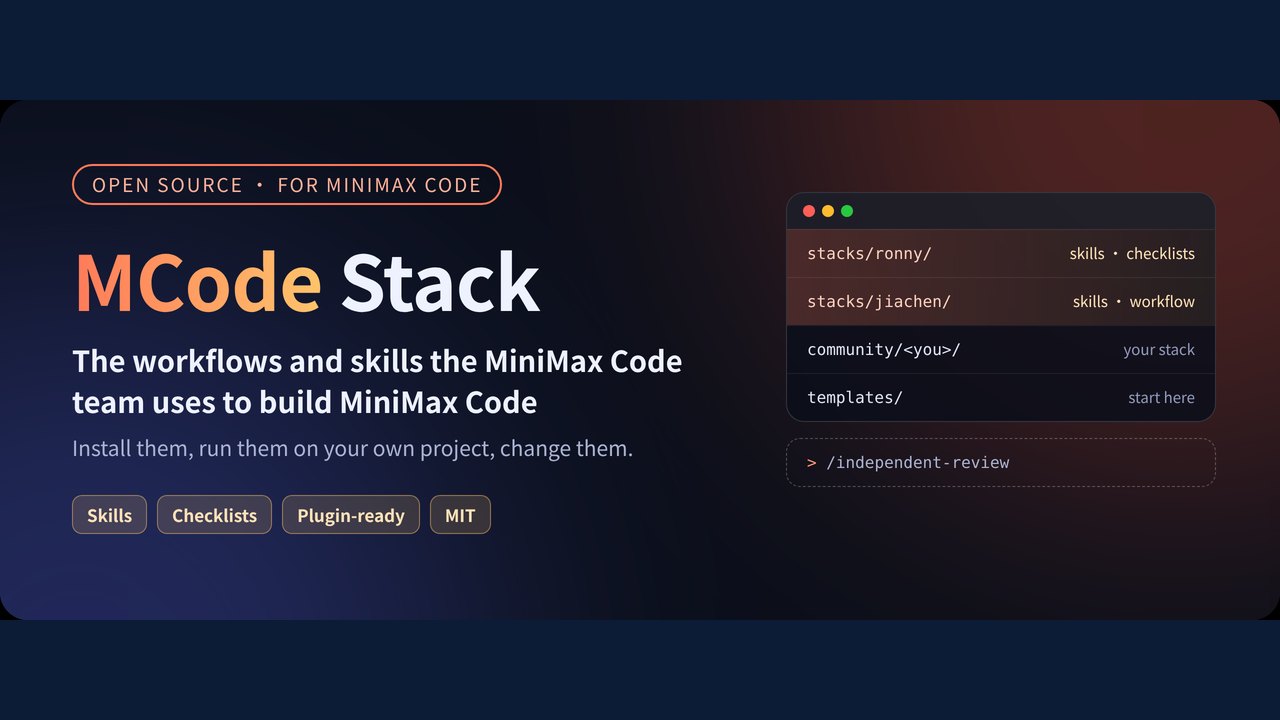
Image: GitHub · Photo source · Resized and letterboxed to 16:9; no AI generation
The MiniMax Code team has published an open-source repository detailing the daily workflows, skills, and engineering habits used in developing MiniMax Code. The release, hosted on GitHub under the `MiniMax-AI/mcode-stack` repository, provides runnable checklists and tools designed to integrate with AI coding assistants.
According to the documentation, the project is not a theoretical collection of best practices but a practical set of resources used internally by the team. These include methods for maintaining code quality with AI, delegating tasks to subagents, managing long-running commands, and structuring context during sessions.
Available Stacks and Features
The repository organizes resources into several installable stacks, each containing specific plugins and skills formatted around the common `SKILL.md` standard:
- Stacks/ronny: The baseline stack included in primary installation scripts.
- Stacks/jiachen: Includes specialized tools such as `lifting-loops`, designed to automate manual steps performed alongside agents, and `making-content`, which transforms notes into structured image posts and short vertical video materials.
- Stacks/req-tpm: An optional requirement-management stack that integrates with Feishu docs and Meegle (Feishu Project) to track product requirements, design decisions, and ship gates.
- Stacks/youfang: Features `magic-move-deck`, a tool that generates offline HTML slide decks with animated transitions based on architecture walkthroughs.
Installation and Verification
Users can install the stacks through multiple methods depending on their setup:
- Plugin Marketplace: MiniMax Code desktop users can add the marketplace by entering `MiniMax-AI/mcode-stack` under Plugins, though this feature is rolling out gradually and may not be available on all versions.
- Script Installation: A repository clone provides installation scripts (`scripts/install.sh`) supporting targets like `ronny`, `jiachen`, `req-tpm`, and `youfang` when paired with compatible tools like Claude or Codex.
- Manual Directory Placement: Individual skills can be placed directly into designated directories such as `.agents/skills/`, `.minimax/skills/`, or `.claude/skills/` for project-specific or global use.
Once installed, users can verify availability by opening a new session and typing `/skills` in MiniMax Code, or by managing local plugins through the Plugins panel using `Ctrl+R` to refresh.
Contribution Guidelines and Licensing
The repository is licensed under the MIT license, with certain engineering skills adapted from Google Engineering Practices under CC-BY 3.0 as noted in respective documentation. While public issues and discussions are welcome, pull requests for code and documentation are currently restricted to repository collaborators. Non-collaborators are advised to open an issue to discuss proposed changes first.
AI-assisted reporting; source claims are attributed and have not been independently verified.
More to read
 MiniMax Releases Open-Source Terminal Coding Agent for Local and Cloud Models
 MiniMax-AI Releases OpenAgentCore: An Open-Source, Self-Hosted Implementation of the OpenAI Agents API
 Open‑Source ‘pstack‑claude’ Brings Cursor‑Based Agent Workflows to Claude Code, Copilot and More
 Garry Tan Releases gstack: An Open-Source Virtual Engineering Team for AI Coding Agents
Trending on GlobeWire Daily
Selected from recent coverage and related topics; not live search rankings.
 Madhya Pradesh Government Plans Revenue Generation from 117-Year-Old Edward Villa in Mumbai Through Leasing
 iPhone 18 Pro Named TechRadar Product of the Year 2026
 Google Project Suncatcher Runs Gemma 4 AI on Orbiting Satellite and Receives First Response
 Gender Disparities in Eye Care Access Across India Examined
 Satellite Images Show Cyclone Arnab Weakening Over India As New System Brews
 Expanding Green and Blue Spaces Crucial for India's Economic and Public Health, Reports Indicate